

How TrakarIA Rental works

One rental. One vehicle context from departure to return.

Plan the rental, document the handover, compare the return and share the final record without rebuilding the vehicle at every stage.

One continuous rental recordEvidence stays with the vehicle
DepartureBaseline capturedReturnDifferences reviewedNext useReady with context

01 · Plan

Know what is expected to leave, what is coming back and where a conflict needs attention.

Keep the rental, the vehicle and its operating window in one planning context before the handover begins.

  • The commitment keeps its vehicle contextRental RENT-2048 stays tied to the vehicle, customer and agreed dates.
  • Conflicts appear before another promise is madeExisting work and the proposed rental can be reviewed together before the schedule changes.
  • The team stays in control of the decisionThe supported resolution is chosen explicitly; the planning view does not pretend to optimise the fleet automatically.
Rental workspace RENT-2048 · Jaguar F-Type Coupé
  1. 01Rental added
  2. 02Context checked
  3. 03Conflict found
  4. 04Decision confirmed
23–30 SeptemberPlanning the rental
Mon 23Tue 24Wed 25Thu 26Fri 27
Jaguar F-Type
Available
RENT-2048 · Alex MartinMaintenance hold
Reviewed resolutionMaintenance moved after the reviewed returnConfirmed
Draft saved01 / 04

02 · Depart

Turn the booking into a structured departure record.

Open the correct rental, start the check-out and give every agent the same route through vehicle condition, handover facts and acknowledgement.

  • Start from the scheduled rentalThe agent opens the right vehicle and customer context instead of starting a disconnected form.
  • Keep the handover resumableA draft can preserve the work already captured when the agent needs to pause and continue.
  • Make the remaining work visibleCondition, context, handover and summary stay distinct throughout the check-out.
Rental workspace RENT-2048 · Jaguar F-Type Coupé
  1. 01Scheduled
  2. 02Vehicle selected
  3. 03Check-out started
  4. 04Draft saved
Today’s departuresRental handover queue1 ready now
Unprepared gray Jaguar F-Type photographed outdoors with its license plate visible
RENT-2048Jaguar F-Type Coupé Alex Martin 24 Sep · 09:00
Correct vehicle Guided handover Resumable record
Draft saved01 / 04

03 · Baseline

Record what actually leaves with the customer.

Capture comparable vehicle views, mileage, fuel or charge, documents, equipment, cleanliness and acknowledgement inside one guided departure session.

Image-assisted readings remain suggestions until a person reviews them.
  • Condition viewsFront, rear, sides and interior evidence stay labelled against the departure.
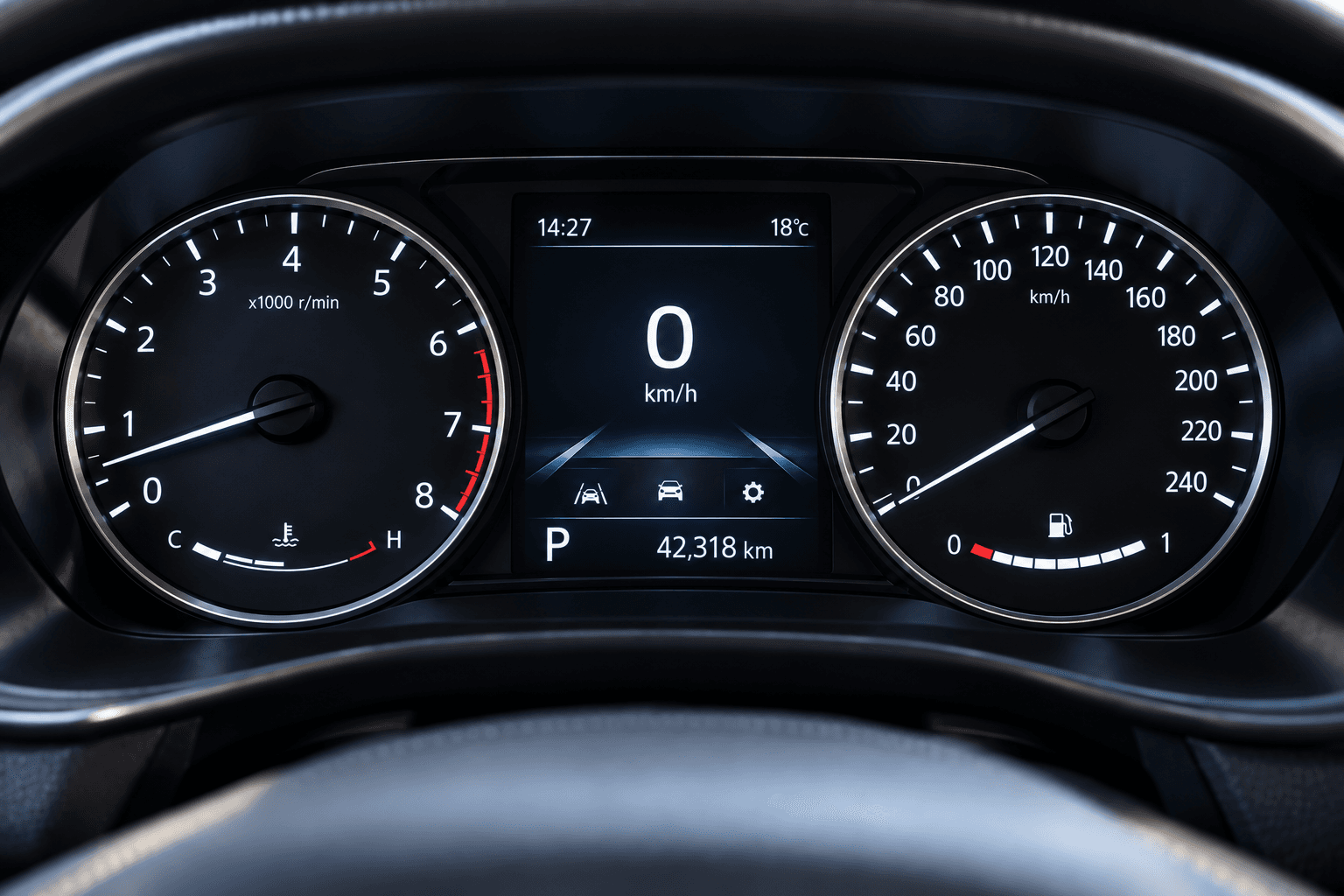
  • Mileage and energyThe dashboard image supports a reviewed 42,318 km reading and a 100% fuel baseline.
  • Handover contextKeys, documents, equipment and cleanliness remain beside the evidence.
  • AcknowledgementCustomer and agent acknowledgement complete the operational record without being marketed as a qualified electronic signature.
Rental workspace RENT-2048 · Jaguar F-Type Coupé
  1. 01Readings
  2. 02Handover
  3. 03Photos
  4. 04Rental details
  5. 05Confirm
Departure dashboard showing 42,318 kilometres and a full fuel tank Preparing dashboard scan
Departure readingsScanning
Mileage—Suggested
Fuel level0/8 · Reading
Image-assistedReading the instrument cluster
Draft saved01 / 05

04 · Rent

Know what is currently out and what is expected back next.

The active rental remains visible with its expected return, vehicle context and supported follow-up instead of disappearing after the keys leave the desk.

  • Rental in progressThe vehicle, renter and departure baseline remain part of the same active cycle.
  • Expected returnThe agreed handback remains visible to the team before it becomes urgent.
  • Supported follow-upConfigured reminders can prepare the next contact without promising delivery or receipt.
Rental workspace RENT-2048 · Jaguar F-Type Coupé
  1. 01In use
  2. 02Return expected
  3. 03Follow-up ready
Unprepared gray Jaguar F-Type photographed outdoors with its license plate visibleIN USE
RENT-2048Alex Martin
Departed
24 Sep · 09:14
Expected return
27 Sep · 17:30
Baseline
Reviewed
Follow-up preparedCustomer reminder configured
Draft saved01 / 03

05 · Return

Start the return from the departure record, not from memory.

Reopen the same rental, load the validated departure baseline and capture the return in the same evidence structure.

  • Departure reference loadedThe return begins with the views, mileage and energy that were validated at check-out.
  • The same views are recapturedComparable structure makes later differences easier to review.
  • Return readings stay with the evidenceThe reviewed return records 42,604 km and fuel at 80%.
Rental workspace RENT-2048 · Jaguar F-Type Coupé
  1. 01Load baseline
  2. 02Recapture
  3. 03Read mileage
  4. 04Review return
Departure baseline loaded6 views · 42,318 km · fuel 100%Recorded 24 Sep · 09:14
Draft saved01 / 04

06 · Compare

See what changed — not what someone remembers.

Put departure and return evidence next to each other, calculate the supported reading differences and organise condition findings for review.

  • +286 km42,318 km at departure becomes 42,604 km at return.
  • 100% → 80% fuelEnergy context remains readable beside the two source images.
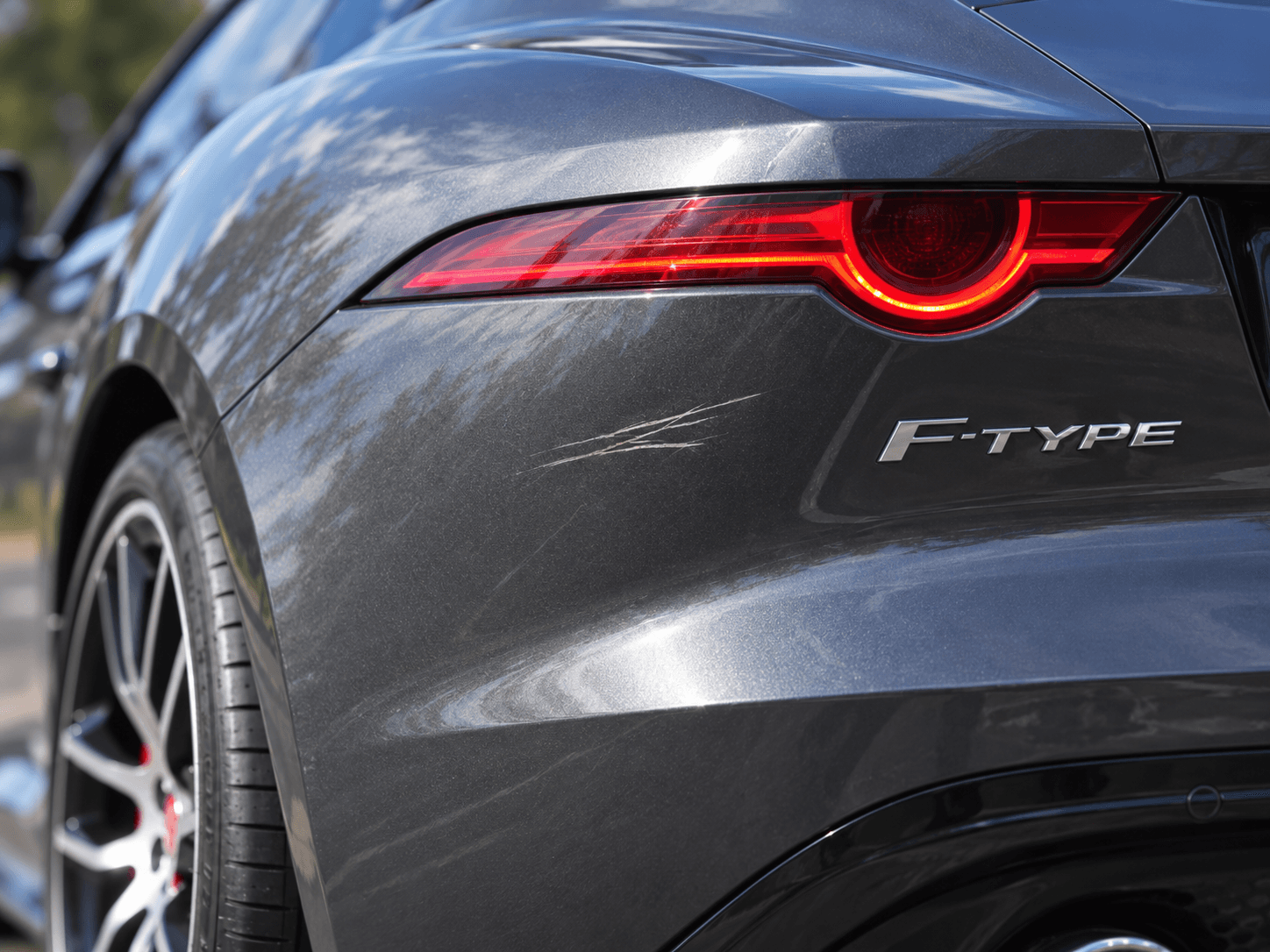
  • One condition difference preparedA rear-left bodywork scratch is surfaced as a finding to review, not an automatic liability decision.
Same rental · reviewed sourcesDeparture ↔ Return
Departure24 Sep · 09:14
Departure dashboard showing 42,318 kilometres and a full fuel tank
Mileage
42,318 km
Fuel
100%
Return27 Sep · 17:42
Return dashboard showing 42,604 kilometres and fuel at 80 percent
Mileage
42,604 km
Fuel
80%
Distance+286 kmFuel100% → 80%Condition1 finding to review

07 · Review

Review the differences before the rental is closed.

Automation can prepare the comparison and suggest a finding. Your team checks the source images, confirms what belongs in the record and keeps responsibility as a separate human and legal decision.
  • Source evidence stays inspectableDeparture and return images remain available beside the prepared difference.
  • Suggested is not confirmedThe reviewer can confirm, adjust or ignore the proposed condition finding.
  • Only the reviewed record moves forwardSharing and history use the result the team actually validated.
Rental workspace RENT-2048 · Jaguar F-Type Coupé
  1. 01Prepared
  2. 02Review
  3. 03Confirmed
Close-up of scratches below the left rear light of a gray Jaguar F-Type1
Draft saved01 / 03

08 · Share

Share the final report without rebuilding the evidence.

Finalize one readable rental condition report, then use the supported email, protected link, QR or PDF output from the same reviewed record.

  • Controlled public reportResource-scoped access and an access code can protect the shared record where configured.
  • Email, link and QRChoose the supported channel without reconstructing the comparison.
  • Portable PDFKeep a portable version of the finalised result for the handover or customer file.
Rental workspace RENT-2048 · Jaguar F-Type Coupé
  1. 01Finalised
  2. 02Choose access
  3. 03Send
  4. 04Available
Rental condition reportRENT-2048
Unprepared gray Jaguar F-Type photographed from the side outdoors
Departure
42,318 km · 100%
Return
42,604 km · 80%
Review
1 confirmed finding
Draft saved01 / 04

09 · Ready

Close the cycle without losing what the vehicle needs next.

The reviewed return becomes the starting context for the next departure. Its photos, readings and confirmed findings stay with the vehicle, so the team continues from trusted evidence instead of rebuilding the same baseline.

  • The return becomes the next referenceReviewed return photos, mileage and fuel or charge remain available as the vehicle's latest condition context.
  • Confirmed findings carry forwardA reviewed damage finding or due task remains visible instead of disappearing when the rental closes.
  • Ready restarts the operating loopOnce the supported checks are complete, the vehicle can enter its next departure with an existing baseline to build from.
Rental workspace RENT-2048 · Jaguar F-Type Coupé
  1. 01Rental closed
  2. 02Evidence retained
  3. 03Next baseline
  4. 04Ready to depart
Unprepared gray Jaguar F-Type photographed outdoors with its license plate visibleRETURN REVIEW
Unprepared gray Jaguar F-Type photographed from the rear three-quarter outdoorsClose-up of scratches below the left rear light of a gray Jaguar F-Type1
Return evidence retained6 photos · 1 confirmed finding
Next departureBaseline ready from the reviewed return
Vehicle recordJaguar F-Type Coupé · Unit R-024
Rental completedRENT-2048 · 27 SepReturn evidence6 photos · 1 confirmed findingNext baselineReviewed return context preparedOperating stateReady for a new departure
Draft saved01 / 04

Run the complete Rental cycle

Plan it. Hand it over. Compare the return. Keep the result.

Take one real rental through TrakarIA, or bring a representative vehicle to a focused demo and map the cycle your team runs today.

  1. 01Plan
  2. 02Baseline
  3. 03Compare
  4. 04Ready
One rental memoryContext carries forward.